memcached between PHP and MySQL: a beginner’s take
Engineering follow-up added November 14, 2026
A cache hit is useful only if the saved work matters
The original account contains an actual early result from our application: the cache avoided roughly a thousand database queries in the first 10-15 minutes. That is a count of avoided queries in one observation window, not a measurement of latency, revenue or how another application will behave.
The useful next step is to define what the cached object represents. Caching a complete query result can simplify the caller, but its key must identify the inputs that change that result: the query parameters, relevant user or tenant scope, and any version needed when the stored format changes.
- Miss: read the authoritative data and build the result.
- Store: save it under the agreed key with a deliberate expiry.
- Hit: reuse it only within that key’s scope.
- Change: invalidate or replace affected entries when the underlying data changes.
- Failure: let cache loss behave like a miss rather than losing the authoritative record.
For the next experiment, compare database query count, application latency and database load over the same interval. Keep the traffic mix in the record. A hit counter alone cannot show whether a cache saves expensive queries or mostly inexpensive ones, and a separate full-page cache can change which requests reach this layer.
The server list in the original PHP example shows how that client was configured. It is not a modern installation guide. Keep cache services on a controlled network, check the current client API, and design for entries disappearing. The obsolete embedded Flash player is no longer loaded; the written account and original chart remain.
Reference: Memcached user guide.
Original note
 Today’s a big day: I’ve finally added a proper, almost production-ready caching layer between PHP and the database, MySQL. I chose memcached (http://danga.com/memcached/). It was developed for LiveJournal and is now used on plenty of other projects too, including LiveJournal, Wikipedia, Flickr, Bebo, Twitter, Typepad, Yellowbot, Youtube, Digg, WordPress, Craigslist, Mixi and thousands more. I’ve added it to our project Free Ringtones. Fortunately, traffic there keeps growing. With no more than 3 hours of work, I’ve now managed to cut the load considerably. A few tips for beginners: if you’re caching data fetched from a database, use methods similar to getAll in Pear::DB, so you don’t have to put the query results into the cache row by row. Think about distributing requests across several memcached servers from the start.
Create a $MEMCACHE_SERVERS array containing the servers’ IP addresses
and add them all in a loop
foreach($MEMCACHE_SERVERS as $server){

$memcache->addServer ( $server );

}
I also recommend an excellent video in which Andrey Smirnov explains the library’s main advantages in plain language.
The embedded player from the original post is no longer available.
And here are my results from the first couple of minutes. Green means cache hits; beige means database queries.
Hits & Misses
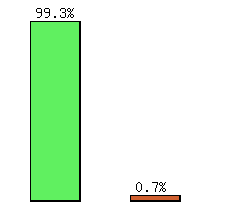
As you can see, in 10-15 minutes I saved the database from almost a thousand unnecessary queries. That’s with another caching layer already in place for this project, saving completed pages to the filesystem.